

Major Tech MT300 Wall Scanner | 300mAH, LCD Display overview
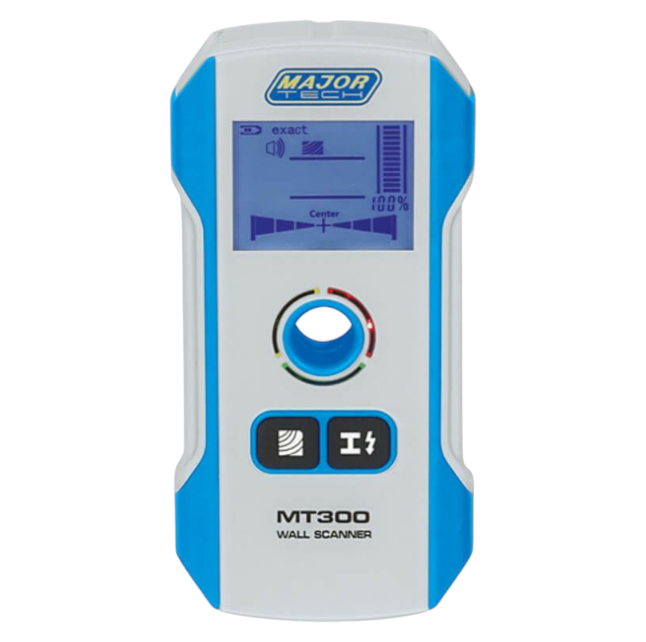
Major Tech MT300 Wall Scanner is a versatile detection tool designed for renovation and installation projects. With 3‑in‑1 functionality, it locates wood studs, metal pipes, and live AC wiring. Its deep scanning capability reaches ferrous metals up to 120mm, while the large LCD display provides precise graphical feedback. Automatic calibration, audible alerts, and a centre marking hole make it safe and easy to use.
Major Tech MT300 Wall Scanner benefits and features
6‑in‑1 detection: Identifies wood, metal, and live AC wiring
Deep scanning: Detects ferrous metals up to 120mm
LCD graphical interface: Pinpoints object centres with clarity
Safety alerts: Prevents drilling accidents by detecting live cables
Audible beep: Provides clear detection feedback
Centre marking hole: Simplifies alignment for drilling or cutting
Automatic calibration: Guarantees consistent accuracy
Compact design: Portable and user‑friendly for professionals and DIY projects
Accessories included: Carry case, USB charger, Velcro strips
Steps to follow for using the Major Tech MT300 Wall Scanner
Preparation
Charge the scanner fully using the USB charger.
Clean the wall surface and attach Velcro strips if needed to prevent scratches.
Power on the device and allow automatic calibration.
How to use the Major Tech MT300 Wall Scanner
Place the scanner flat against the wall surface.
Select the detection mode (wood, metal, or AC wiring).
Move the scanner slowly across the surface.
Watch the LCD display for graphical feedback.
Use the centre marking hole to mark detected points.
Cleanup
Power off the scanner after use.
Wipe the device with a dry cloth.
Store in the carry case for protection.
A few scenarios where the product can be used
Locating studs for mounting shelves or TVs
Detecting pipes before drilling into walls
Identifying live AC wiring during renovations
Carpentry projects requiring precise alignment
DIY home improvement tasks
Other products you might like for your renovation projects
Health and safety
Always use the scanner before drilling or cutting into walls to avoid damaging pipes or live wiring. Operate in well‑lit conditions to ensure accurate readings on the LCD display. Keep the device charged and calibrated for consistent performance. Avoid exposing the scanner to moisture or extreme temperatures. Store safely in the carry case when not in use.
Want to know more about using a wall scanner? Click here to learn more.


Reviews
There are no reviews yet.